
A function is a block of code with a name. You call the name and the block runs.
If you want to see this used on real problems instead of toy examples, the Practical Python Bundle has seven short projects built around everyday Python.
Write one when you have the same lines in more than one place, or when a piece of code does one job and you want to name that job.
You run the same lines once instead of copying them everywhere.
When you call the name, Python runs the block that goes with it.
Understanding Python Functions
A function splits your code into named pieces. You have used one already, print():
print("Hello world") |
The point of a function is that you can call it again:
print("Coffee") |
Creating a Python Function
To define a function in Python, adhere to the following syntax:
def <function_name>([<parameters>]): |
Here’s a breakdown:
defsignals Python that you’re defining a function.function_nameis the name of your function and should be unique in your code.parametersare optional inputs that your function can use.:concludes the function header.<statement(s)>are the actions or commands within the function, also known as the function’s body. Always remember to indent them by four spaces.
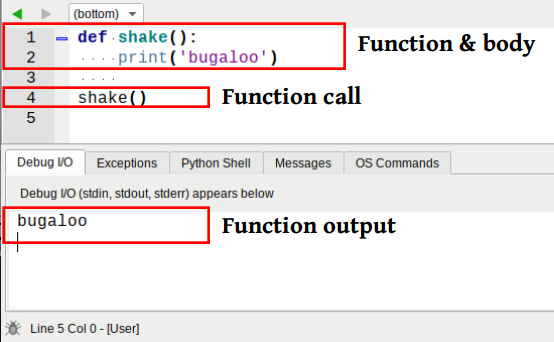
Let’s see a simple function f() in action:
def f(): |
Calling it again just runs the same block again:
f() |
Your function’s body can also span several lines:
def hello(): |
Function Parameters and Arguments
Parameters are the values a function takes. Keep them in the same order when you call it:
def hello(name): |
To define multiple parameters, separate them with commas:
def f(name, salary): |
The arguments have to match the parameters, same order and same number. A function with no operations in it has an empty body, so it needs pass to be legal Python.
Using Default Parameters
A default parameter is used when the caller leaves the value out:
def f(x=5,y=4): |
Understanding Function Scope
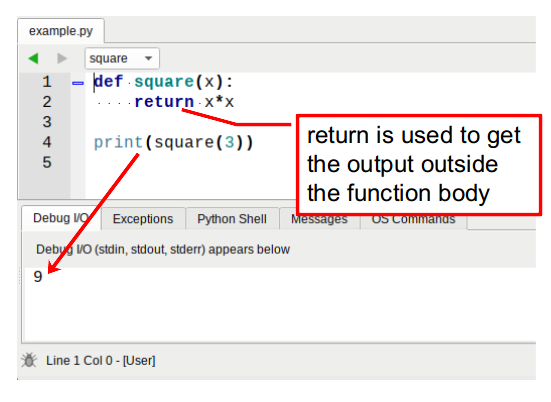
A variable inside a function only exists there. To get a value out, return it:
The Power of the Return Statement
Then you can store the result or use it straight away:
def sum(a,b): |
You can return more than one value at once, Python gives you a tuple:
def f(a,b,c): |
Handling Variable-Length Arguments
When you do not know how many arguments there will be, take a list or a tuple:
def f(*args): |
Embracing Docstrings
A docstring is a string right under the def line that says what the function does. Write one for anything you or somebody else will read later.
The Significance of the main() Function
The main() function, commonly used in Python scripts, serves as the program’s entry point. It’s especially useful for scripts meant to be both standalone and importable modules.
Summing Up
That is functions in Python: the syntax, arguments, defaults, return values, scope and docstrings. Everything else on this page builds on that.
If you want to try this yourself, the exercises on PyChallenge turn the same idea into a few short problems with instant feedback.
You got a small typo below the first block of code. I think it's supposed to be 'y=3'. :)
Thanks Sebastian!
How do you do addition and subtraction?
By the way I am a beginner
When I initially commented I clicked the "Notify me when new comments are added" checkbox and now each time a comment is added I get three e-mails with the same comment. Is there any way you can remove people from that service? Cheers!
Removed your mail address, should be good now. Let me know if you still get mails