
What is list comprehension?
If you want to see this used on real problems instead of toy examples, the Practical Python Bundle has seven short projects built around everyday Python.
A list comprehension builds a new list in one line. It is a for loop with the result appended, written on one line. Everything you can do with a for loop you can do here, it is just shorter.
List comprehensions are an easy way to create lists (based on existing lists).
Its much easier to write a one liner than it is to write a for loop, just for creating a list. This _ one liner_ is called a list comprehension.
Introduction
In Python, the syntax of list comprehension is:
list_variable = [x for x in iterable]
Assume we want to create a list containing 100 numbers. Manually that would be a lot of typing work. So we would use a for loop, right?
We can define a for loop to fill the list.numbers = []
for i in range(0,100):
numbers.append(i)
print(numbers)
That works, but it’s to much work. Instead you can use list comprehension.
You can replace all the code above with a one liner, which is how we obtain the same result:numbers = [ x for x in range(100) ]
yes, inside the list we use a loop and the range() function
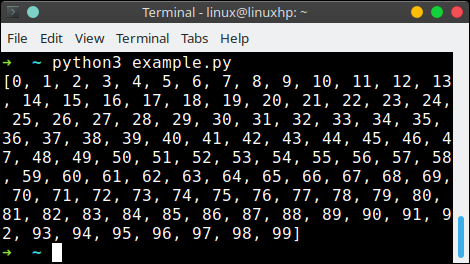
This is also useful if you want to create large lists.
List Comprehensions
Assume we want all the square roots to 100:import math
numbers = [ math.sqrt(x) for x in range(100) ]
print(numbers)
You can also use it like this:
h = [ letter for letter in 'hello' ] |
An if statement can be inside a list comprehension
number_list = [ x for x in range(20) if x % 2 == 0] |
It can be used on a list of strings too:
player_list = [ 'alice','xena','bob','veronica' ] |
The form
[what_to_put_in for item in collection if condition]
The filter at the end is optional. Without it you take every item, with it you keep only the ones that pass.
It works with any iterable: a list, a tuple, a string, the result of
range() or a file object.
A comprehension inside a comprehension is possible but gets hard to read fast. If it does not fit on one line, a normal for loop is clearer.
There is a generator version with round brackets instead of square ones,
(x for x in data). It gives the values one by one and never builds the full
list, which saves memory on big data.
On Python 3 you can also use sum(...), min(...) and
max(...) with a generator instead of writing the loop yourself.
The fastest way to learn this is to write it yourself. The PyChallenge exercises run in your browser, no install needed.