
Text output is one of the basics in Python programming. Not all Programs have graphical user interfaces, text screens often suffice.
The print() function writes to the terminal. It is the first output you
will use, and it has more options than most beginners know.
You can output to the terminal with print function. This function displays text on your screen, it won’t print.
Print function
The terminal is a very simple interface for Python programs. While not as shiny as a GUI or web app, it’s good enough to cover the basics in.
Create a new program (text file) in your IDE or code editor.
Name the file hello.py. It only needs one line of code.
To output text to the screen you will need this line::
print("Hello World") |
Run the program (from terminal: python hello.py)
If you run the program:
$ python hello.py |
Print newline
The program above prints everything on a single line. At some point you’ll want to write multiple lines.
To write multiple lines, add the ‘\n’ character:
print("Hello World\nThis is a message") |
Results in:
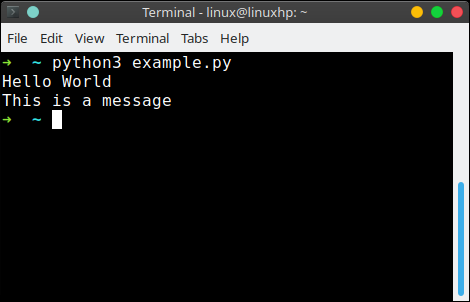
\n create a new linePrint variables
To print variables:
x = 3 |
This will show:
3 |
To print multiple variables on one line:x = 2
y = 3
print("x = {}, y = {}".format(x,y))
Will give you:
x = 2, y = 3 |
Useful arguments
print('a', 'b')puts a space between the values.print('a', 'b', sep='-')changes that separator.print('a', end='')changes what comes after, so the next print continues the same line.print()with nothing gives an empty line.print(f'{name} is {age}')puts variables in the text. This is an f string and it is the way to go.print(len(s))prints a number, no quotes needed.
print works with any object. A list is shown with its brackets, which is fine for debugging but not for output that a user reads.
To write to a file instead of the screen, see how to write a file in Python.
Reading helps, writing fixes it. PyChallenge has exercises on this and you can try them right now.
simple, straightforward and very clear. Am so new to python this is the best tutorial have come across. Thank you guys
This was the easiest way to start learning python. I can't wait to learn more.
Very good tutorials,straight to to point and understanding what each line does.
How am I erase other python codes on cmd.(what's the code to erase)
Run your python script as a file, such as 'python hello.py'.
Then on windows:
on linux:
There is a problem when you write
name = input("What your name")and you must type the string with '' or "", or else you can get NameError
I used
name = input("Enter your name:")print(name)
when i input name is number, print is ok, but when i input a char, print error message
name = input('Enter your name:')File "", line 1, in
NameError: name 'a' is not defined
why?
instead you can use
name=raw_input("whats your name")I have the NINJA-IDE installed on my windows computer right now and I tried entering the first line shown here with no result when I press run project. Am I doing something wrong or maybe I am just not using it right? I am brand new to this whole thing and could really use a helping hand if anyone would be willing. Thanks in advance and sorry for the long post.
Use raw_input for your Python version
In the menu bar on top, press "project,run file" or "project,run project"
the code of print multiple variables show be below:
if the last line of the code is
the text of output is
Please correct it, thank you
Resolved
Thanks for simple and descriptive script.
x = float(input("35"))is the same as
x = int(input("35"))