
APIs are not always available. Sometimes you have to scrape data from a webpage yourself. Luckily the modules Pandas and Beautifulsoup can help!
Scripting is where Python really pays off. The Python Scripting Essentials Bundle has the kind of small automation projects you would build for work.
When a site has no API but the data sits in a table, you can scrape the table and put it straight into a pandas DataFrame. From there you can sort, filter and plot it like any other dataset.
Web scraping
Pandas has a neat concept known as a DataFrame. A DataFrame can hold data and be easily manipulated. We can combine Pandas with Beautifulsoup to quickly get data from a webpage.
If you find a table on the web like this:
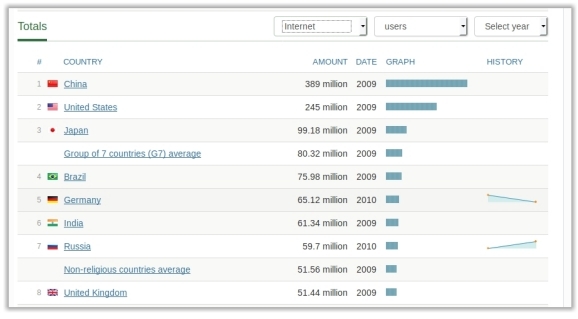
We can convert it to JSON with:
import pandas as pd
import requests
from bs4 import BeautifulSoup

res = requests.get("http://www.nationmaster.com/country-info/stats/Media/Internet-users")
soup = BeautifulSoup(res.content,'lxml')
table = soup.find_all('table')[0]
df = pd.read_html(str(table))
print(df[0].to_json(orient='records'))
And in a browser get the beautiful json output: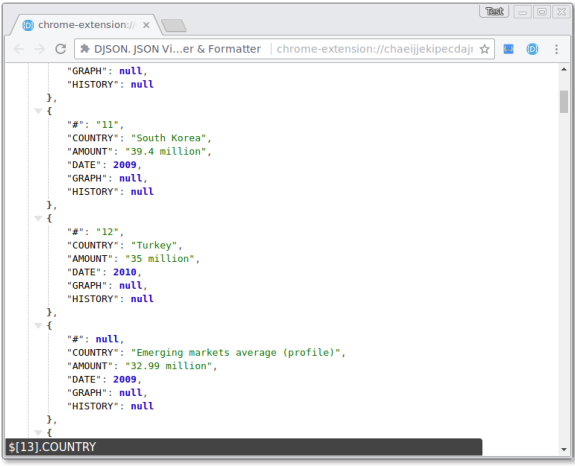
Converting to lists
Rows can be converted to Python lists.
We can convert it to a dataframe using just a few lines:
import pandas as pd
import requests
from bs4 import BeautifulSoup

res = requests.get("http://www.nationmaster.com/country-info/stats/Media/Internet-users")
soup = BeautifulSoup(res.content,'lxml')
table = soup.find_all('table')[0]
df = pd.read_html(str(table))[0]
countries = df["COUNTRY"].tolist()
users = df["AMOUNT"].tolist()
Pretty print pandas dataframe
You can convert it to an ascii table with the module tabulate.
This code will instantly convert the table on the web to an ascii table:
import pandas as pd
import requests
from bs4 import BeautifulSoup
from tabulate import tabulate

res = requests.get("http://www.nationmaster.com/country-info/stats/Media/Internet-users")
soup = BeautifulSoup(res.content,'lxml')
table = soup.find_all('table')[0]
df = pd.read_html(str(table))
print( tabulate(df[0], headers='keys', tablefmt='psql') )
This will show in the terminal as: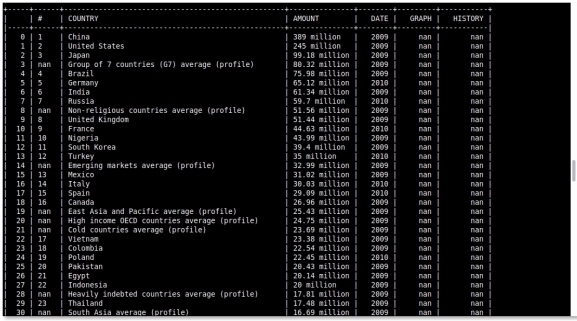
Download web scraping examples
The steps
- Download the page with
urllib.request.urlopen(). - Find the table with
soup.find('table'). - Pull the rows with
table.findAll('tr'). - Pull the cells with
row.findAll(['td', 'th']). - Build a list of lists and hand it to
pd.DataFrame().
pd.read_html(url) does the same in one line and works when the page is
a plain table. It is worth trying first.
Add a User-Agent header, check the status code and put a small delay between requests. Scraping too fast is the easiest way to get blocked.
Want more practice on this? Practise this on PyChallenge, there are short browser exercises you can run right after reading.
Very cool, thank you!
its bewildering to think that in 5 line of code you can have structured data from the mess that is HTML. I think this sort of workflow would do well in my side project https://github.com/joelgrif..., which could easily do this for single page apps. Thanks for posting!
Great posting. Is it possible to obtain data from a webpage graph? All the data points in graphs on webpages i.e. from here https://www.bullionvault.co...
Yes, I got it by viewing the network traffic in dev tools (F12 in your browser, network tab). You can see its calling to prices.json
Is it possible to read graphs/bar charts/complex diagrams and create alt text using python? If I'm using a PDF, can we do this? Also if we have standalone images, can we do the same for these? Please share your thoughts/advise.... Thanks
Yes, it's possible to parse diagrams. If they're on the web you may get the data from json, otherwise you need a computer vision algorithm to parse it. For standalone images you would need to parse it with a vision algorithm.
great job!
Thanks for the post. This helps, but I'm trying to programmatically get the pricing for Azure storage. The pricing is posted here: https://azure.microsoft.com.... If I run the sample code you have, I get "$-" for the pricing because the table selections (storage type, region, dollars) appear not to have a default. How can I select those and then scrape the results?
The price depends on region (javascript). BeautifulSoup works well with static-html, but we need Javascript support for this data. Selenium works well with Javascript.
To get the data we could use the selenium module (works with webdriver). We use Chrome driver or PhantomJS to get the raw html data, then process as usual. Install selenium and a webdriver.
Working code below:
That's awesome. Thanks so much
Thank u very much fr the post. Its really helpful