
Python’s input() function allows users to fetch keyboard input directly from the console. This method reads the keyboard input data and instantly returns it in the string data type format.
The input() function reads a line from the keyboard. It waits until the
user presses enter and then gives you back what they typed.
What you get back is always a string. That is the part that surprises most beginners.
For those who have worked with earlier Python versions, specifically Python2.x, you might recall the raw_input() method. However, note that that this method has been deprecated. In modern Python, input() is the standard method for receiving console input.
How to Use the input() Function in Python
Fetching Strings from the Terminal
By default, the input() function retrieves data as a string. So when you use this function, you are essentially obtaining a text object. Here’s a demonstration:
name = input("Your name: ") |
Reading Integers from the Console
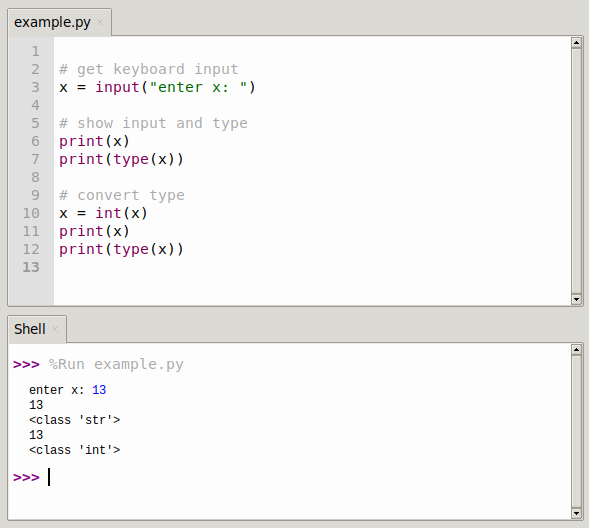
While the input() function by default captures and returns data as strings, there’s a common requirement to read integers. For this, you need to perform type casting:
number = input("Enter a number: ") |
To convert the captured string into an integer, you can use the int() method:
number = int(input("Enter a number: ")) |
Taking Lists as Input in Python
Python’s input() function can also facilitate the input of lists. Initially, you should take the input as a standard string and then break it down using a specified delimiter, like a comma. Here’s a step-by-step process:
data = input() |
As observed, the captured data is in string format. To transform these strings into integer values:
int_list = [int(item) for item in str_list] |
You can use various delimiters with the split() method, including but not limited to (a,b,c...), 1,2,3..., %, !, *, and space.
data = input() |
What comes back
age = input('How old are you? ') gives you a string, even when the user
typed a number. Then age + 1 puts the two together instead of adding, so you
get '181' or a TypeError.
Convert it first:
int(input('...'))for a whole number.float(input('...'))for a decimal number.eval()is another way but never use it on user input.
int() raises a ValueError when someone types letters, which crashes the
program. Wrap it in a try and except and ask again, or check with
str.isdigit() first.
In Python 2 there was a separate raw_input() for this. It is gone in
Python 3, input() does the same job.
The fastest way to learn this is to write it yourself. The PyChallenge exercises run in your browser, no install needed.