
Reading files is straightforward: Python has built in support for reading and writing files. The function readlines() can be used to read the entire files contents.
There is more to it than this one function. The Python Data I/O Mega Pack covers reading and writing files, csv, json, Excel and working with a database.
SQL is the language you use to ask a database questions. If you want to get better at it, SQLCrab runs real queries in the browser, nothing to install.
Reading a file is one call. Which call you pick depends on whether you want the whole thing, line by line, or as one string.
Read file into list
We call the function method open to read the file, then we call the method readlines() to read all of the file contents into a variable. Finally we print out all file data.
Example read file:
#!/usr/bin/env python |
Content will contain a list of all strings in the file.
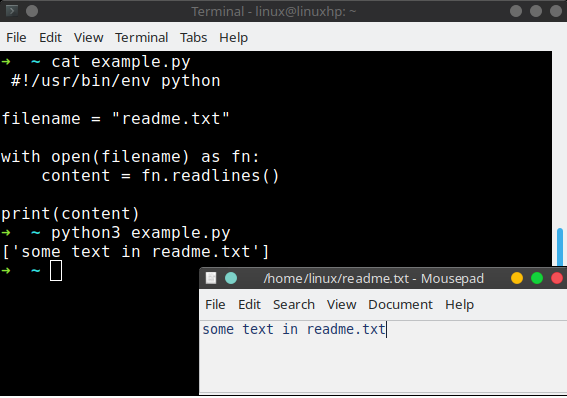
If you print the variable content:print(content)
you would see a list. Every item of the list contains one line.
However, every line of the list contains the newline character \n.
To remove the newline characters from the list use:
content = [x.strip() for x in content]
Read file into string
If you want to read a file into a string variable, you can use a different method.
The code below reads the entire file data into a single string.#!/usr/bin/env python
filename = "x.py"
contents = open(filename,'r').read()
print(contents)
The three ways
f.read()gives you the whole file as one string.f.readlines()gives you a list with one string per line, newlines included.for line in f:reads the file line by line, which is best for big files.f.readline()reads a single line.
Use a with block so the file is closed for you:
with open('data.txt') as f:
content = f.read()
To strip the newline characters, use f.read().splitlines() or
[line.strip() for line in f].
For csv and json files you have a module for it, csv and json.
Reading those with open and split is more work than it looks.
If you want to try this yourself, the exercises on PyChallenge turn the same idea into a few short problems with instant feedback.
Why are you using
for readingand
for writing
?
I create the object f, which I later use for the write() method.
It might be nice to include an explanation of "with" in this part. I had to look it up, and it appears to be a generalization of the 'for' statement that is unique to Python.
From what I've seen, these are tutorials for experienced programmers as to the differences between Python and other languages and while a long drawn out explanation would defeat the purpose of brevity, a short sentence explaining the reason for using 'with' and contrasting with 'for' should suffice.
While I'm typing, I also would like to say how much I appreciate these tutorials, they are exactly what I needed and HOLY CRAP DO I LOVE PYTHON IT IS SO AWESOME.
Is it possible that the f is invalidate as open failed ?
Is there any way to read binary files with this type of code?
This code will read a file line by line, where a line is separated by a newline character. To read binary files you can use this code:
When I launch this, I receive following error message:
Can it be related with the Python version?
I have 2.4.3
Yes, the with keyword is included in version 2.5.2 and higher
how to read the .DAT file (binary data of Image) in python. And i need to convert it to .TIFF(or .JPEG) file. It will be very helpful if i get an answer.
Thanks in advance
try using the PIL module http://stackoverflow.com/qu...
Yes, if file does not exist
hello,
Thanks. Actually i have an .DAT file which is 4 dimensional image( Of Type FLOAT and Size of 104MBytes. I am not able to convert using PIL. Could you please help in converting it to .JPEG or :TIFF file.
Thanks in advance
Is it raw data? what is the data format?
how to rename file?
you can use the os module for that. os.rename(src, dst)