
A socket client opens a connection to a server and talks over it. Every time you open a website or use a chat app, a socket is doing this work behind the screen.
Scripting is where Python really pays off. The Python Scripting Essentials Bundle has the kind of small automation projects you would build for work.
Writing a client yourself is the best way to see what the libraries hide.
Writing one yourself is the best way to see what the libraries hide.
Sockets are how programs talk to each other over a network.
A Brief Overview of the TCP/IP Model
The TCP/IP model defines the architecture that facilitates computer network communications. This model is structured in layers, with each layer fulfilling a distinct role in the communication process. Notably, packets of data are relayed between computers based on this model.
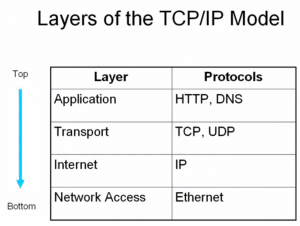
Your program is in the application layer. It decides what the two sides say to each other, and it uses a socket to say it.
Pro Insight: Sockets and the TCP/IP model aren’t exclusive to a handful of applications. Instead, they underpin all network-based applications.
Crafting a Simple Python Socket Client
Here is a small client that connects to a server and sends a line.
Here’s a step-by-step breakdown of how a web browser retrieves a webpage:
- Initiates a socket.
- Resolves the server’s IP address using the domain name.
- Establishes a connection to the server via the resolved IP.
- Dispatches a request to the server.
- Receives the webpage data from the server.
In the realm of code, this process can be represented as follows:
# Emulating a web browser with a socket client in python |
What you get back is raw html text. Your program has to render it, so the images and css in it will not show up on their own.
Fetch More Network Examples Here
The steps
socket.gethostbyname(hostname)turns a name into an ip address.client_socket = socket.socket(socket.AF_INET, socket.SOCK_STREAM)creates the socket.client_socket.connect((hostname, port))opens the connection. The port decides what service you reach, 80 for http, 443 for https, 25 for mail.client_socket.sendall(b'message')sends. It takes bytes, not a string, so add theb.response = client_socket.recv(4096)reads up to 4096 bytes.client_socket.close()ends the connection.
One recv call is not one line of the answer. It gives you whatever arrived first. A proper client loops until the server says it is done, and it needs a timeout so a silent server cannot freeze your program.
If you want to try this yourself, the exercises on PyChallenge turn the same idea into a few short problems with instant feedback.
# this line should be like this
s.sendall(request.encode())