
Strings in Python can be defined using quote symbols. An example of a string definition and output below:s = "Hello World"
print(s)
If you want to see this used on real problems instead of toy examples, the Practical Python Bundle has seven short projects built around everyday Python.
A string in Python is text between quote marks. You can use single or double quotes, they work the same. What is between the quotes is taken literally, and a backslash does something special.
This will output to the terminal:
Accesing array elements
You may access character elements of a string using the brackets symbol, which are [ and ]. We do so by specifying the string name and the index.
The example below prints the first element of a string.
print(s[0]) |
To print the second character you would write:print(s[1])
String Slicing
You can slice the string into smaller strings. To do so you need to specify either a starting, ending index or both. Let us illustrate that in the Python shell:
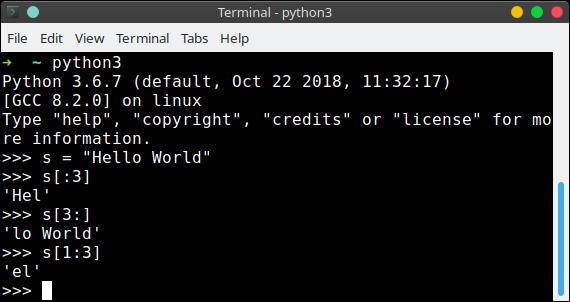
If no number is given, such as in s[:3] it will simply take the beginning or end of teh string. We have accessed the string as if it was an array.
What you can do with a string
- Join two with
+orf'{a} {b}'. An f string is faster and easier to read. - Repeat with
*, so'-' * 40gives you a line. - Index with
s[0]. Counting starts at zero, so the last character iss[-1]. - Slice with
s[0:5], the end is not included. s.upper(),s.lower(),s.strip(),s.replace('a', 'b'),s.find('a'),s.split(',').len(s)gives the number of characters.- Strings cannot be changed. Every method returns a new string.
A string is a sequence, so a for loop over it gives you one character at a time.
The fastest way to learn this is to write it yourself. The PyChallenge exercises run in your browser, no install needed.
"teh string"
I laughed when I saw that XD
So substrings are just specified like parts of a list?
Can you do it with lists too, like
?
Yes, they are specified like parts. It works with lists too. Both of them can be manipulated using the same style.